Legal DMS

What is contract management software?

Somewhere in your company right now, a signed contract is sitting in a folder named "Finalv3ACTUAL_signed.pdf," and nobody on your team remembers which vendor it belongs to until renewal week forces the question. That scramble, hunting for a document you know exists but cannot locate, is the reason contract management software became its own category. If you have typed "what is contract management software" into Google, you are probably past wondering whether you need a better system and into the harder question: what do these tools actually do, and how much of it do you really need?

Methods compared

Method 1: Organized folders plus content-aware renaming (the lightweight first step)

The path most teams take long before they are ready for a full platform, and one plenty of teams never need to move past. You keep your existing storage and make it searchable by fixing the file names, so a folder of scanned and downloaded contracts starts behaving like an index. It solves the single most common contract pain, we cannot find the contract we signed, without a migration or a workflow rollout.

Pros
  • Fast to set up, often the same day
  • Works on your existing storage, no migration required
  • Fixes your backlog of old, badly-named scanned contracts that new-CLM-only tools ignore
  • Low cost relative to a full platform license
Cons
  • No approvals, no built-in e-signature, no workflow routing
  • No automatic renewal alerts or obligation tracking
  • Relies on you to open and act on a contract once it is found, the tool will not chase anyone for a signature
  1. Centralize your existing contracts into a shared drive or document system, even if it is just a well-structured folder tree by counterparty or department.
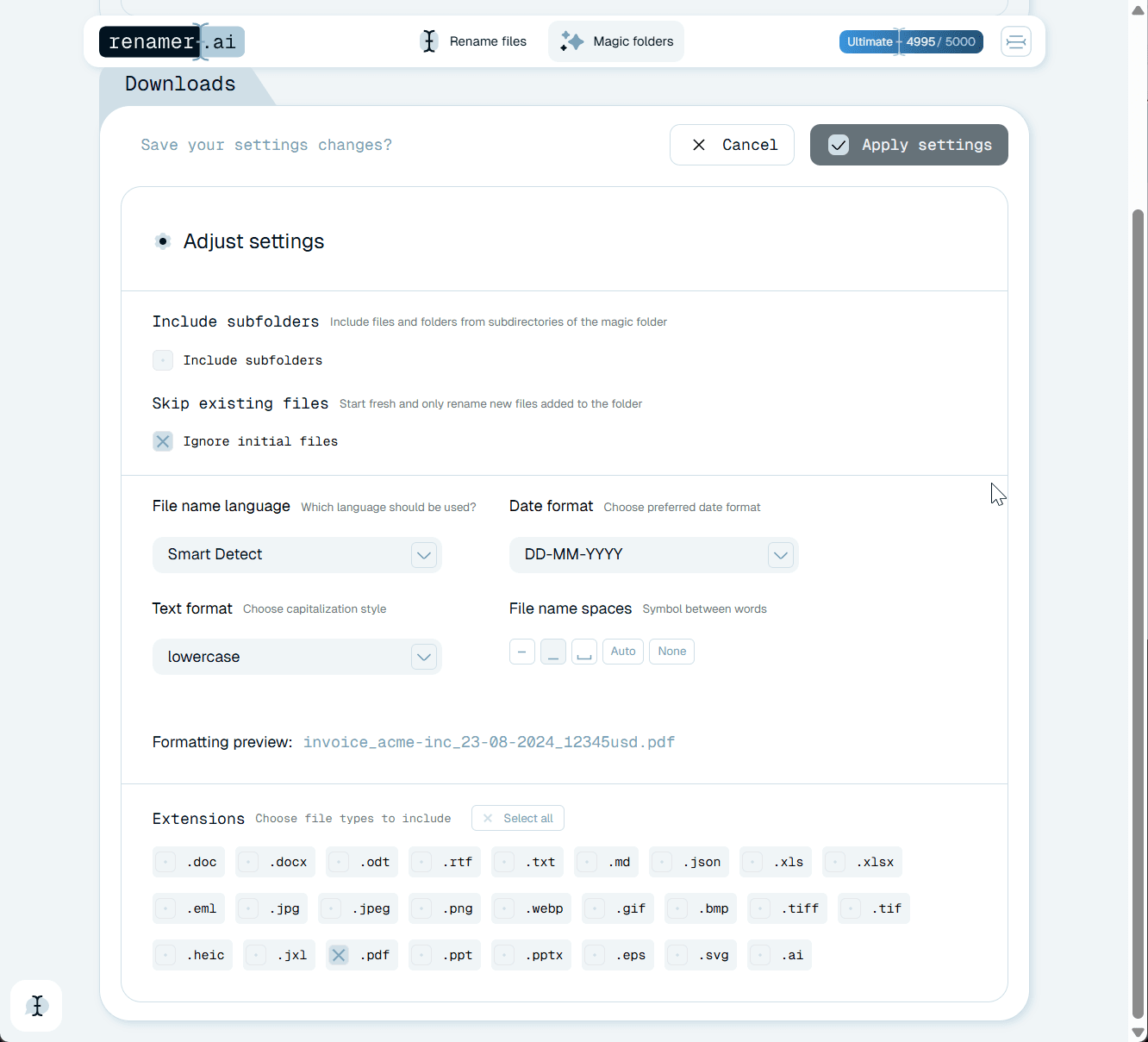
  2. Run your existing PDFs and scanned contracts through an OCR-based renaming tool so file names reflect what is inside the document, not whatever your scanner or email client called it.
  3. Set naming conventions (counterparty, contract type, effective date) and apply them automatically going forward with a folder-watching automation.
  4. Search by name instead of opening files one by one, since a consistent naming pattern turns your folder structure into a searchable index.

Method 2: Dedicated CLM platform (full lifecycle coverage, higher cost and setup)

The heavier path, and the right one once you are managing active negotiation, approvals, and renewals at volume. A CLM platform covers the whole contract lifecycle in one system, from drafting through signature to renewal tracking, at the cost of real setup and per-seat licensing. It is powerful when you use the whole lifecycle, and overkill when your only real problem is finding contracts that already exist.

Pros
  • Covers the entire lifecycle in one system, from drafting to renewal
  • Built-in e-signature and approval workflows remove your manual chasing
  • Renewal alerts prevent missed deadlines and unwanted auto-renewals
  • Reporting gives visibility into contract volume, value, and cycle time
Cons
  • Real implementation effort: template migration, workflow configuration, and change management typically take weeks
  • Licensing cost scales with seats and features, verify current pricing directly with each vendor
  • Does not automatically fix historical contracts sitting in your old folders with unhelpful file names, that backlog still needs cleanup first
  • Overkill if your only real problem is finding contracts that already exist
  1. Select a CLM vendor based on which lifecycle stages you need covered (drafting, negotiation, e-signature, or all of it).
  2. Migrate your existing templates and, where possible, historical contracts into the platform's repository.
  3. Configure approval workflows so contracts route to the correct legal, finance, or department reviewers automatically.
  4. Set renewal and obligation alerts tied to each contract's key dates.
  5. Train your team on the new drafting, redlining, and e-signature process, since adoption is what determines whether the platform sticks.

Method comparison

The two approaches solve different problems. Match the method to the bottleneck you actually have.

DimensionMethod 1: Folders + OCR renamingMethod 2: Dedicated CLM platform
Setup timeSame day to a few daysWeeks (migration, config, training)
CostLow, tool subscription onlyHigher, scales with seats and features
Covers drafting and negotiationNoYes
Covers e-signatureNoYes
Covers approvals and workflowNoYes
Covers renewal alertsNoYes
Fixes existing scanned/legacy contractsYes, this is the core strengthOnly if migrated in, often skipped
Makes contracts searchable by contentYes, via descriptive file namesYes, via repository metadata
Best fitTeams whose main pain is finding the contractTeams managing the full lifecycle at volume

What contract management software actually does

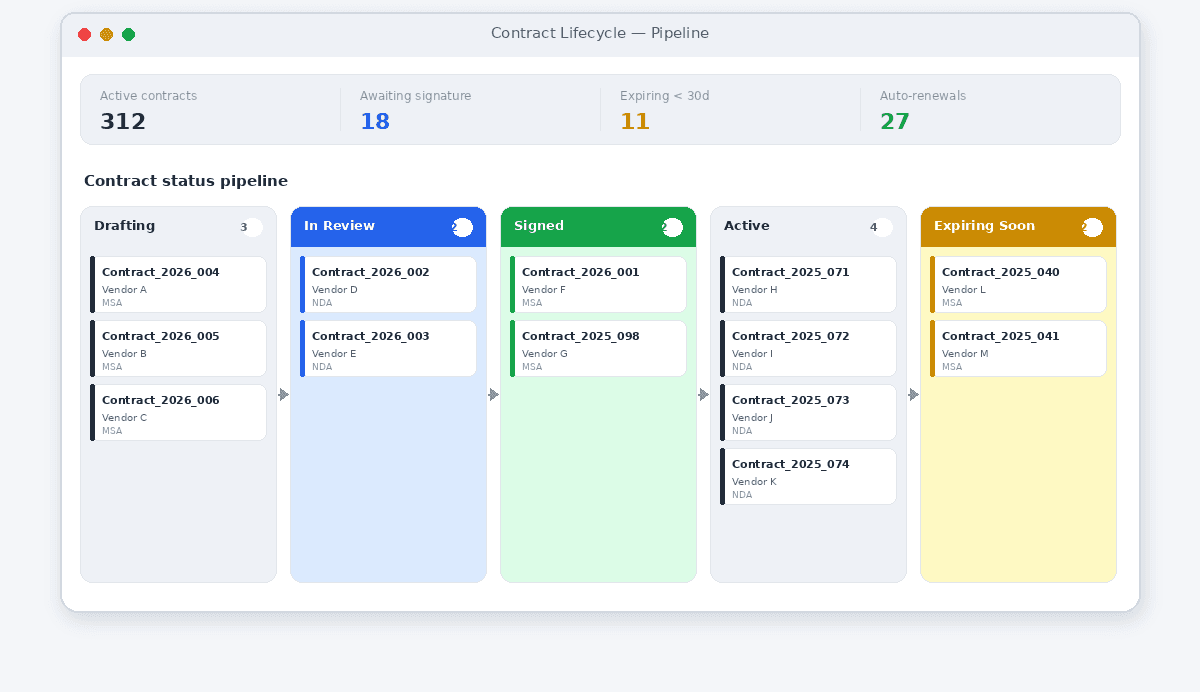
Contract management software, often shortened to CLM for contract lifecycle management, is a category of tools built to handle a contract from the moment someone drafts it to the moment it expires or renews. A contract itself is a legally enforceable agreement between parties, as Cornell Law School's Legal Information Institute defines it, and that lifecycle, from draft to enforcement to expiration, is exactly what these tools are built around. That is the part most explainers skip: it is not one feature, it is a lifecycle, and different tools cover different parts of it.

The five stages of the contract lifecycle

Most CLM functionality maps to one of five stages. Knowing which stage is your bottleneck is the whole game:

  • Creation: drafting the contract, usually from a template or clause library, so your legal team is not rebuilding the same NDA from scratch every time.
  • Negotiation: tracking redlines, comments, and version history as both sides go back and forth, ideally without twelve email attachments named v1, v2, and v2_final.
  • Execution: getting the contract signed, typically through e-signature, with an audit trail proving who signed what and when.
  • Storage: keeping your executed contract somewhere searchable, tagged with the right metadata (counterparty, contract type, effective date, value), so you can find it in seconds instead of hours.
  • Renewal and obligation tracking: flagging expiration dates, auto-renewal clauses, and deliverables before they become a missed deadline.

A platform that covers all five stages is a full CLM system. Plenty of teams only ever touch stage four, storage and findability, because that is where the daily pain lives.

Core features to expect from a CLM platform

Most vendor-built CLM tools bundle some combination of the following. You will not need every one, but this is the checklist worth having before you evaluate anything:

  • Clause and template libraries for standardized drafting
  • Redlining and version comparison during negotiation
  • Built-in or integrated e-signature
  • A searchable, centralized repository with metadata tags
  • Approval workflows that route contracts to the right reviewers automatically
  • Renewal and expiration alerts tied to calendar reminders
  • Reporting on contract value, cycle time, and obligation status
  • Integrations with your CRM, ERP, or accounting systems

What to look for in contract management software

Feature lists look similar across vendors until you are the one using the tool. Before you commit budget, check these:

  • Does it match your actual bottleneck? If negotiation is slow, prioritize redlining and collaboration. If contracts get lost after signing, prioritize search and tagging.
  • How much setup does it require of your team? Some platforms need weeks of template migration and workflow configuration before you see value.
  • Can it read your existing contracts? A tool that only handles new contracts going forward leaves your entire backlog, including scanned paper contracts, exactly where it is today.
  • What is your real cost, including implementation and training, not just the license line? Verify current pricing directly with each vendor, since it changes often and varies by seat count and tier.
  • Does your team need the whole lifecycle, or just part of it? Buying a five-stage CLM platform to solve a one-stage problem is how a budget turns into a shelved tool nobody logs into after month three.

The scanned-contract problem nobody's CLM guide mentions

Here is what actually happens before any lifecycle software gets involved: someone scans a signed contract, or you receive one as a flat PDF from an e-signature tool, and it lands in your folder as Scan2026-01-15143022.pdf or IMG_4471.pdf. Multiply that across five years of vendor agreements, NDAs, and lease renewals, and you get a repository where the files exist but you cannot search for them by anything meaningful. That is not a lifecycle problem, it is a day-one findability problem, and it is the one most contract management explainers skip because it is not glamorous enough for a feature list.

This is where OCR-based renaming earns its place in your stack, even alongside a full CLM platform. Renamer.ai was built specifically for this gap: it reads the actual content of your scanned or digital contract, including counterparty names, dates, and contract type, and generates a descriptive file name from what it finds. Point it at a folder of legacy contracts and it works through the backlog for you; set up folder monitoring and it keeps your new scans and signed PDFs named consistently as they arrive, without you retyping file names. It is the unglamorous first mile of contract organization, and it is usually your fastest available fix, whether or not a full CLM rollout is on your roadmap.

If you are building out contract management for construction subcontracts and change orders, our construction contract management software guide walks through that file-volume problem. If your main question is cost rather than capability, our free contract management software roundup and our contract management software free guide cover the two different flavors of free worth knowing. And if you have decided you need the full lifecycle platform, our best contract lifecycle management software comparison breaks down how the leading vendors stack up.

Where to start

If your contracts are already signed and just hard to find, do not wait on a six-week CLM rollout to fix that. Clean up your naming first, see what is actually in your backlog, and decide on a full platform once you know precisely which lifecycle gap is costing you time. That is the honest order of operations, and it is the one most vendor guides skip because it does not sell a platform license.

You can try the naming step with {{freeFiles}} free renames to see whether it fixes your backlog before you decide on anything bigger. Get started free.

Frequently Asked Questions

What is contract management software in simple terms?

It is software that handles some or all of a contract's life, from drafting and negotiation through signing, storage, and renewal tracking. Some tools cover the whole lifecycle; others focus on one stage, most commonly storage and findability.

What are the main contract management software features?

Clause and template libraries, redlining and version comparison, e-signature, a searchable repository with metadata tags, approval workflows, renewal alerts, and reporting on contract volume and cycle time. Few teams use every feature; most lean on the two or three that match their actual bottleneck.

What should you look for in contract management software before buying?

Start with the specific bottleneck you are solving (drafting speed, lost contracts, missed renewals), then check setup time, whether it can ingest your existing backlog of scanned contracts, and your total cost including implementation, not just the license price. Confirm current pricing directly with each vendor.

What is the best contract management software?

It depends entirely on which lifecycle stage is your actual problem. Full-platform comparisons belong on a dedicated evaluation, which is what our [best contract lifecycle management software](/best-contract-lifecycle-management-software) comparison is for. If your problem is specifically that old contracts are unsearchable, that is a narrower question with a narrower answer.

Does renamer.ai manage contract approvals, e-signatures, or renewals?

No, it does not. Renamer.ai does not handle approvals, e-signature, workflow routing, clause libraries, redlining, or renewal alerts, and it is not a repository or storage system. What it does is read the content of your contract files, scanned or digital, and rename them descriptively so they are findable by counterparty, type, and date. Think of it as the organizing layer that sits ahead of or alongside a full CLM platform, not a replacement for one. You can try it with 25 free renames first.

Do you need a full CLM platform, or would organizing your existing contracts be enough?

If your main complaint is that you cannot find the contract you signed two years ago, organizing and renaming what you already have solves that directly and immediately. If you are also managing active negotiation, approval chains, and renewal deadlines across a growing contract volume, that is when a dedicated CLM platform's workflow and alerting features start earning their cost. The two are not mutually exclusive: plenty of teams clean up their existing files first, then evaluate a full platform once they know exactly what they need it to do.

FUTURISTICA d.o.o. © 2024–2026 FUTURISTICA d.o.o. All rights reserved. Ul. Frana Žižka 20 2000 Maribor, Slovenia, Company Registration: EU, Slovenia