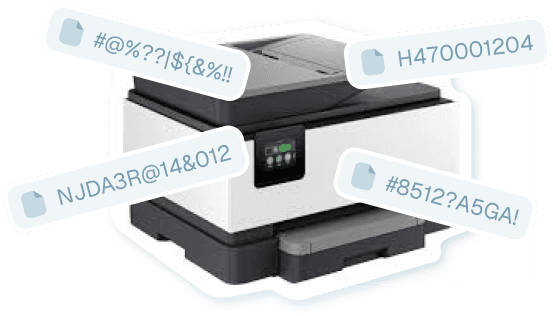
Stop Drowning inScan0001.pdffiles
Renamer.ai fixes them automatically -
every single time.
Works With All Scanners:





The Scanner File NightmareThe Solution
See how Renamer.ai transforms chaos
into clarity - automatically
Meaningless Scanner Names
Which one is the invoice you need? Good luck finding it!
Clear, Searchable Names
Find any document instantly with search - zero manual work!
Templates
Use the Renaming template to set up naming
configuration for renaming:
Three Minutes
to Setup, Lifetime
of Organization
The simplest way to never lose
a scanned document again
Pick Your Folder
Point Renamer.ai to your scanner's output folder. Usually " Scanned Documents" or " Downloads" . Takes 30 seconds.
Scan As Usual
Use your scanner exactly like you always do. Files arrive with their usual terrible names. You don't do anything.
It's Renamed!
Within seconds, AI reads your document and renames it perfectly. Automatic. Forever. Never think about it again.
Magic Folders:
Set It and Forget It
Watch your scanner folder in the background - every file gets organized automatically
Magic Folders monitor your scanner directory 24/7. The moment a new scan appears, Renamer.ai instantly reads it, understands what it is, and renames it to something meaningful.
No popups. No interruptions. No manual work. Just perfectly named files, every single time.
- Processes files in 3-5 seconds
- Works with all scanner brands
- Multiple folders supported
- Runs silently in background


More than 6100+ happy users
Game changer for our
accounting team. No more
confusion with invoice files -
everything is clearly named
and easy to locate.Game changer for our accounting
team. No more confusion with
invoice files - everything is clearly
named and easy to locate.Game changer for our accounting team.
No more confusion with invoice files - everything
is clearly named and easy to locate.
Devon LaneNexus Digital Solutions
Why Scanner Users Choose Renamer.ai?
Zero Manual Work
Never rename a scanned file again. Set it up once in 3 minutes, then forget about it forever.
Find Anything Instantly
Descriptive filenames mean your computer's search actually works. No more opening files one by one.
Private & Safe
Files sent via encrypted API, processed for naming, then instantly deleted. No storage. No copies. Ever.
Saves Hours Monthly
Average users save 4+ hours per month on file management. That's 50 hours per year back in your life.
Smart Document Understanding
Identifies invoices, receipts, contracts automatically. Extracts names, dates, amounts for perfect naming.
Have a question or need help? Contact us directly.
Have any questions?
If you have unique requirements that aren't covered by our plans, feel free to contact us,
we'll find a solution that works for you!
Renamer FAQ
What is Renamer.ai and how does it work?
Renamer.ai is an AI-powered file renaming tool that automatically organizes your digital files by analyzing their content. Our advanced OCR technology reads documents, images, and other files to generate descriptive, searchable names. Instead of manually renaming "IMG_2847.jpg" or "Document1.pdf," Renamer.ai creates meaningful names like "invoice-acme-corp-2024-03-15.pdf" or "team-meeting-notes-march-2024.docx" based on what's actually inside your files.
How much does Renamer.ai cost?
We offer 4 flexible pricing plans to fit different needs: Starter Plan: Free - 25 files per month (perfect for testing), Pro Plan: $9.95/month - 200 files per month (ideal for individuals), Power User Plan: $29.95/month - 1,000 files per month (best value - saves 40%), Ultimate Plan: $99.95/month - 5,000 files per month (for heavy users). All plans include our desktop app, bulk renaming, Magic Folders automation, and support. No long-term contracts - cancel anytime.
What file types does Renamer.ai support?
Renamer.ai supports 30+ file formats including documents (PDF, DOC, DOCX, ODT, RTF, TXT), spreadsheets (XLS, XLSX), images (JPG, PNG, WebP, GIF, BMP, TIFF, HEIC), presentations (PPT, PPTX), vector files (EPS, SVG, AI), and email files (EML). Our AI reads the actual content of each file to generate intelligent, descriptive names regardless of format.
Does Renamer.ai work as a PDF renamer and photo renamer?
Yes! Renamer.ai is a powerful PDF renamer and photo renamer that uses AI to understand your file content. For PDFs, it extracts key details like dates, amounts, company names, and document types to create meaningful names (e.g., "invoice_acme_2024-03-15_1250usd.pdf"). For photos, our AI vision describes the image content and creates descriptive names (e.g., "photo_office_manager_drinking_coffee.png"). Both work with Magic Folders for automatic renaming as files arrive.
Can Renamer.ai rename files in different languages?
Yes! Renamer.ai supports 20+ languages including English, Spanish, French, German, Italian, Portuguese, Dutch, Chinese, Japanese, and many more. Our Smart Detect feature automatically identifies the language in your files, or you can manually select from our full language list. This makes it perfect for international teams and multilingual document management.
What are Magic Folders and how do they work?
Magic Folders are our automation feature that monitors designated folders and automatically renames files as they arrive. Simply: 1) Select any folder (like Downloads or a shared drive), 2) Toggle Magic Folders "on" for that location, 3) Choose your preferred naming pattern, 4) Files get renamed automatically in the background. Perfect for automating downloads folders, client document drops, or any location where files regularly appear. You can pause or resume monitoring anytime.
Is Renamer.ai safe and secure for my files?
Absolutely. Your privacy is our priority. We use enterprise-grade encryption to protect your files. When using the web version, uploaded files are stored only temporarily for up to 24 hours to allow you to download the renamed versions. When using the desktop app, your files are securely transmitted to our servers for content extraction and AI analysis, then immediately and permanently deleted once processing is complete - nothing is retained. Renamer.ai is not a storage service; files are only kept as long as necessary to complete the renaming process. Your document content is processed using trusted AI services solely for the purpose of generating descriptive filenames. These services are bound by strict data processing agreements and cannot use your data for model training or any other purpose. We comply with GDPR privacy requirements.
How accurate is the AI file renaming?
Our AI achieves 95%+ accuracy for quality documents and has a 92% user satisfaction rate. The accuracy depends on file quality - clear scans and well-formatted documents work best. For handwritten text or very poor quality scans, results may vary. You can always preview changes before applying them and undo any renames if needed.
Can I customize how Renamer.ai names my files?
Yes! You can create custom naming templates using our drag-and-drop template builder. Choose from variables like: Document type, date, and ID numbers; Company and person names; Invoice numbers and amounts; Project details and status; Custom context fields. We also provide pre-built templates for common use cases like invoices, business documents, and project files.
Do I need to install software or can I use it online?
Renamer.ai offers both options: Desktop App (Windows & Mac): Full features including Magic Folders automation, custom templates, and bulk processing; Web Interface: Quick renaming for testing without installation. The desktop app provides the complete experience, while the web version is perfect for trying out the service or handling occasional files.
How many files can I rename at once?
You can process multiple files simultaneously with our bulk renaming feature. The exact number depends on your plan: Starter: 25 files per month, Pro: 200 files per month, Power User: 1,000 files per month, Ultimate: 5,000 files per month. For larger volumes, we offer custom enterprise solutions and can handle 10,000+ files monthly with dedicated support.
What makes Renamer.ai different from other file organizing tools?
Unlike simple rule-based renamers, Renamer.ai actually reads and understands your file content. Our key differentiators: Content-aware naming (not just pattern matching); 20+ language support with automatic detection; Magic Folders automation for hands-off organization; OCR technology that reads scanned documents; Custom service offerings - our team can handle massive cleanup projects. We're not just software - we're file organization experts who can design custom solutions for complex needs.
Can Renamer.ai integrate with my existing workflow?
Yes! We offer API access for custom integrations with your existing tools and workflows. Our team can help build connections to: Cloud storage services (Google Drive, Dropbox, OneDrive); Document management systems; Accounting and ERP software; Workflow automation tools. contact us at hi@renamer.ai to discuss custom integration solutions.
What kind of support do you provide?
We offer different support levels based on your plan: Normal Support (Starter & Pro): Email support within 48 hours, knowledge base access; Priority Support (Power User & Ultimate): Email support within 24 hours, priority issue resolution. All users get access to our comprehensive knowledge base.
Can you handle large-scale file organization projects?
Absolutely! Beyond our software, we offer custom services for organizations with complex needs: Mass file reorganization (50,000+ documents); Custom API integrations with your existing systems; Workflow design consultation; Ongoing file management services; Industry-specific solutions. Our team has organized millions of files across hundreds of industries. Contact hi@renamer.ai to discuss your specific challenges.
How quickly does the file renaming process work?
Processing speed depends on file size and complexity: Simple documents: 2-5 seconds per file; Bulk operations: Multiple files processed in parallel; Magic Folders: Near real-time monitoring and renaming; Large files: May take longer but stay under our 100MB limit. Our cloud-based processing ensures consistent speed regardless of your device performance.
What happens if I'm not satisfied with the results?
We want you to be completely satisfied! Here's what we offer: Free Starter plan to test the service risk-free; Preview before applying - see changes before they're made; Undo functionality - reverse any renames easily; Cancel anytime - no long-term contracts; Responsive support to help optimize your results. Most users see immediate value, but if something isn't working right, we'll help make it better.